Before class
During class
After class
Apps by OneScreen
How we choose
Subscribe to our newsletter
Before class
During class
After class
Apps by OneScreen
How we choose
Subscribe to our newsletter
Share, mirror, or connect your touchscreen
Explore ideas and quick videos
Pre-class
Share 1
Connecting the Devices to a Network
Share 2
Downloading the share app on a PC
Share 3
Installing Share on a Phone
In-class
Share 4
Screensharing a PC to the Screen
Share 5
Desktop Sync & Manage Connected Devices
Share 6
Desktop Privacy and Access Peripheral Devices
Share 7
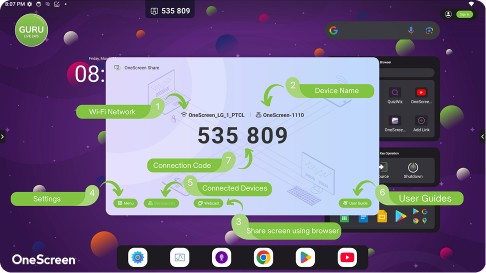
Screensharing from the Web
Share 8
Screensharing a Phone
Share 9
Sharing Media from a Phone
Share 10
Phone as a Remote & Accessing Connected Devices
Share 11
Using Miracast on Windows PCs & Android Phones
Share 12
Using Airplay on Macs & Apple Phones
Share 13
Using Chromecast on Chromebooks, PCs & Phones
×
×
Coming soon…
Stay connected, stay updated!